From the PES format
Brother's proprietary format, one of the most common in home embroidery. It stores stitches, colors and design metadata.
Convert your designs between PES, DST, JEF, EXP and VP3 formats in seconds. Free, no sign-up, with a preview of the converted design.
Drop your file (.pes, .dst, .jef, .exp or .vp3)
or click to browse your files
Convert to PESYour files are only used to perform the conversion. Privacy policy
Drop your PES, DST, JEF, EXP or VP3 file into the conversion area: the source format is detected automatically.
Select the target format among the five supported ones, then start the conversion: it begins instantly.
Get your converted file in seconds, ready to open on your embroidery machine.
Each machine brand reads its native format: that is the one you need to embroider directly. DST, meanwhile, is understood by almost every machine: it is the exchange format to keep as a universal copy. Find the converted file you need from each row below.
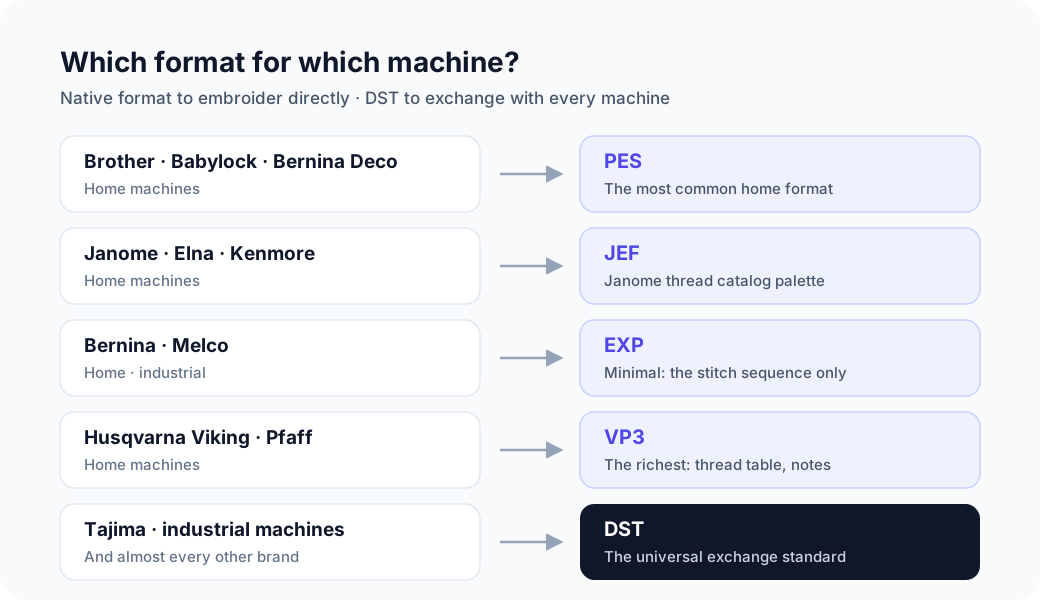
Five formats cover most home and industrial machines, both as input and output. From each card, pick the conversion you need directly.
Brother's proprietary format, one of the most common in home embroidery. It stores stitches, colors and design metadata.
The Tajima format, now the universal embroidery standard. Recognized by almost every machine, it stores no color palette: only thread-change commands.
The native format of Janome and Elna machines. It keeps the original color palette of the design.
A cutting and embroidery format used mainly by Bernina and Melco. Like DST, it carries no color information.
The format of Husqvarna Viking and Pfaff machines. The most complete one: it stores thread colors, notes and up to 255 colors.
StitchConverter is an independent tool, designed and maintained by Lorris Crappier, an embroidery enthusiast and developer. No ads, no data resale: the service lives on Premium passes. Meet the maker on the About page.
Free use allows 2 conversions every 24 h, no account needed: drop your file and get the converted result.
For heavier use, the 24-hour pass (€1) or the monthly plan (€5) lifts the conversion limit. Secure payment via Lemon Squeezy.
The five most common formats, both as input and output: PES (Brother), DST (Tajima), JEF (Janome), EXP (Bernina/Melco) and VP3 (Husqvarna Viking/Pfaff), that is 20 possible conversions.
Brother and Babylock read PES; Janome, Elna and Kenmore read JEF; Bernina reads EXP (often DST too); Husqvarna Viking and Pfaff read VP3; Tajima machines and most industrial ones read DST. When in doubt: native format to embroider, DST to exchange.
Yes: 2 free conversions every 24 h, no sign-up. Beyond that, the 24-hour pass (€1) or the monthly plan (€5) unlocks unlimited conversions.
No. An uploaded file is only used to perform the requested conversion, then deleted immediately. The full details are in the privacy policy.
On a server located in the European Union, only for the duration of the conversion: the file is deleted immediately after the result is sent back. The site itself is served from the Cloudflare network. Details are in the privacy policy.
The stitch count and dimensions are preserved. What can change: colors, since DST and EXP store no palette. Each conversion page details exactly what changes in that direction.
An independent tool designed and maintained by Lorris Crappier, developer and embroidery enthusiast. The service is funded by Premium passes, with no ads and no data resale. The About page covers the story and how it works.
No, no sign-up is required for free use. A Premium account is created automatically when you purchase, and you are identified by e-mail.