Embroidery file formats: DST, PES, JEF, EXP, VP3 — which does your machine need?
Every embroidery machine reads a native format: PES for Brother and Babylock, JEF for Janome, Elna and Kenmore, VP3 for Husqvarna Viking and Pfaff, EXP for Bernina and Melco, DST for Tajima and most industrial machines. To stitch a design, your file needs to be in that format — or converted to it.
By Lorris Crappier · Published 19 September 2026
An image file or a stitch file? The distinction that matters
A JPG or PNG describes pixels: it is a static picture, and an embroidery machine has no idea what to do with it. An embroidery file describes something else entirely: a sequence of instructions — frame movements, stitches placed, pauses to change thread — that the machine replays stitch by stitch. PES, DST, JEF, EXP and VP3 are all files of this second kind.
The practical upshot: you cannot embroider a picture as-is (it first has to be digitized), and you cannot see what an embroidery file contains without the right software. Every format stores the same core instructions, but not the same extras — colors, dimensions, design name. That is where formats differ, and where conversion earns its keep.
Which format for which machine?
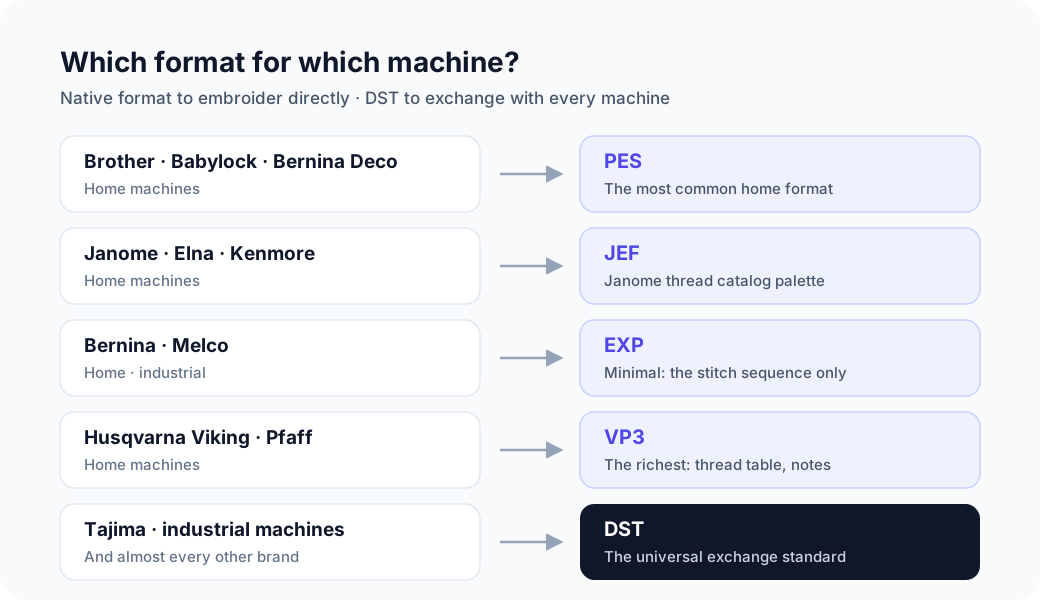
The table below maps each format to the brands that read it natively. Find your machine’s row: that is the format it needs to embroider directly. DST is the exception — understood by almost every machine, it serves as the exchange format.
| Format | Brands | Typical use |
|---|---|---|
| PES .pes | Brother, Babylock, Bernina Deco | Home embroidery |
| JEF .jef | Janome, Elna, Kenmore | Home embroidery |
| VP3 .vp3 | Husqvarna Viking, Pfaff | Home embroidery |
| EXP .exp | Bernina, Melco | Home (Bernina) and industrial (Melco) |
| DST .dst | Tajima and most industrial machines | Industrial and home (standard) |
The five formats in detail
Five formats, five ways of organizing the same stitches. Here is what each one carries — and what it leaves behind.
PES (.pes) — the Brother format
Brother’s proprietary format, and the most common one in home embroidery. A PES file carries the stitch sequence, dimensions in millimeters, a design name and a color palette — with thread references depending on the version. Versions 1 through 12 tracked Brother’s hoop sizes: the converter reads them all.
- BrandsBrother, Babylock, Bernina Deco
- Versions read1 through 12 (they followed Brother hoop sizes)
- ColorsPalette + thread references depending on the version
- MetadataDesign name, dimensions in millimeters
- Internal unitTenth of a millimeter
To share it further: convert a PES file to DST.
DST (.dst) — the universal Tajima standard
Now the industry standard, DST is read by virtually every machine, home or industrial. Its 512-byte text header summarizes the design name (truncated), the stitch count and the dimensions; the stitches themselves are encoded in 3-byte records. It stores no color palette: only thread-change commands.
- BrandsTajima; read by almost every machine
- Header512-byte text (truncated name, counters, dimensions)
- ColorsNo palette: thread-change commands (stops)
- EncodingFixed-length 3-byte records
- Max jump121 tenths of a mm (beyond: intermediate jumps)
To embroider on a home machine: convert a DST file to PES.
JEF (.jef) — the Janome format
The native format of Janome, Elna and Kenmore machines. It keeps the design’s original palette, drawn from the Janome thread catalog, and attaches the file to a hoop from its fixed table — from 80 × 80 mm up to 140 × 200 mm. A design larger than the selected hoop will be rejected by the machine.
- BrandsJanome, Elna, Kenmore
- HoopsFixed table: from 80 × 80 mm to 140 × 200 mm
- ColorsPalette (Janome thread catalog)
- MetadataDesign dimensions, selected hoop
- Internal unitTenth of a millimeter
To send it to a workshop: convert a JEF file to DST.
EXP (.exp) — the lean Bernina and Melco format
Used by Bernina at home and Melco in the workshop, EXP is the leanest of the five: DST encoding without the header. It carries nothing but the stitch, jump and stop sequence — no name, no dimensions, no colors. The geometry is impeccable; everything else is set on the machine.
- BrandsBernina (home), Melco (industrial)
- HeaderNone: the file starts directly with the stitches
- ColorsNo palette: thread-change stops
- EncodingSame as DST (3 bytes), without a header
- MetadataNone (no name, no dimensions)
Convert an EXP file to PES to get colors and metadata back.
VP3 (.vp3) — the most complete of the five
The format of Husqvarna Viking and Pfaff machines is also the richest: a thread table with brand and code (up to 255 colors), digitizing notes, the design’s position within the hoop and dimensions stored at the end of the file. It is the choice that preserves the most information.
- BrandsHusqvarna Viking, Pfaff
- ColorsThread table (brand, code), up to 255 colors
- MetadataDigitizing notes, position within the hoop
- DimensionsMillimeters, stored at the end of the file
- SoftwareHusqvarna 6D/Premier+, Pfaff 6D
To give a DST-sourced design its colors: convert it to VP3.
DST or PES: which one should you pick?
It is the most common dilemma, and it comes down to one question: embroider or exchange? PES is made for stitching on a Brother or Babylock machine: it carries the design’s colors and metadata. DST is made to travel: readable everywhere, it trades the palette for portability. The stitches themselves are identical in both formats.
| DST (.dst) | PES (.pes) | |
|---|---|---|
| Typical use | Industrial and home (standard) | Home embroidery |
| Machines concerned | Tajima and most industrial machines | Brother, Babylock, Bernina Deco |
| Colors | No palette: thread-change commands (stops) only | Includes a color palette (with thread references depending on the version) |
| Metadata | Truncated name, stitch count, dimensions (text header) | Design name, dimensions, thread palette |
| How to open it | With Tajima DG/ML by Pulse, the free Wilcom TrueSizer, or Embird | With Brother PE-Design, Embrilliance Essentials or the free Ink/Stitch |
In practice: you received a DST and you stitch on a Brother? Convert it to PES — the default colors will be worth a quick check, since the DST carried none. The other way round, a PES headed for an industrial shop converts to DST with no loss of stitches. The dedicated DST vs PES comparison details what each direction preserves.
What does a format conversion actually change?
A proper conversion leaves the embroidery untouched: the stitch count and the design’s dimensions are preserved. What changes is everything around the stitches — each format can only store so much.
To a rich format (PES, JEF, VP3)
If the source carries no colors (DST, EXP), a default palette is rebuilt by following the thread-change order: sections keep the original sequence, and the tints are worth a quick check on the machine. If the source is already rich, the palette carries over — right down to VP3’s full thread table.
To a flat format (DST, EXP)
Colors cannot survive the trip: these formats have no palette. DST keeps the design name (truncated) and the dimensions in its header; EXP carries strictly nothing beyond the stitches. Thread choice goes back to being a manual setting.
From one rich format to another
PES to JEF or VP3: the palette is translated into the target format’s thread catalog, and dimensions and design name follow. It is the most transparent conversion there is: nothing that matters gets lost.
Three common mistakes
Renaming the extension converts nothing
Changing “design.dst” to “design.pes” does not alter a single byte: your machine sees a PES it cannot read. A real conversion rewrites the instructions in the target format’s structure — it is a transformation, not a label.
Buying a design in one format without checking your machine
Many shops deliver a single default format. Check the format before you buy — or budget for a conversion: it keeps the stitches, but may drop the palette if it passes through a flat format.
Mixing up an image converter and an embroidery converter
A tool that “converts a JPG to DST” is not digitizing your image: without digitizing there are no stitches — and without stitches, no embroidery. The formats covered here convert between files that are already digitized.
Frequently asked questions
Can I put a DST file on a Brother machine?
Not directly: a Brother machine reads PES. Convert the DST to PES first: stitches and dimensions pass through unchanged, and a default palette is built in thread-change order, since the DST carried none. All that is left is to check the tints on the machine.
Which embroidery format contains the colors?
The home formats. PES embeds a palette with thread references depending on the version, JEF a palette drawn from the Janome catalog, and VP3 the most complete table of all (brand and code, up to 255 colors). DST and EXP store no palette: only thread-change commands.
PES or DST: which one has better quality?
Less of a question than you would think: both formats carry the same geometry, so the same stitch count and the same dimensions. A design’s quality comes from its digitizing, not its extension. The only gap: DST drops the palette and truncates the design name.
How do I open a PES file without an embroidery machine?
With embroidery software: PE-Design, Embrilliance Essentials, or Ink/Stitch, which is free. The free Wilcom TrueSizer viewer reads PES and DST too. And to see the design without installing anything, drop the file into the converter: the preview shows up in seconds, before you download.
Why won’t my file show up on my machine?
Three usual suspects: the format does not match the brand (a JEF will not open on a Brother), the extension was renamed by hand without a real conversion, or the design is larger than any hoop the machine accepts — the JEF hoop table, for instance, tops out at 140 × 200 mm.
Related guides
DST vs PES: what actually differs between these two embroidery formats?The most common matchup in detail: colors, compatibility and what each conversion direction preserves.VP3 file format: guide for Husqvarna Viking & PfaffWhat the most complete embroidery format carries, and how converting to or from it behaves.JEF file format: guide for Janome & ElnaThe native format of Janome and Elna: thread-catalog palette and hoops — and what converting to or from it preserves.Got a file at hand? Drop it into the converter: the source format is detected automatically and the design preview shows up before you download. Two free conversions every 24 h, no sign-up.
Convert a file